Labelbox is a popular tool designed for labelling data, providing precision and ease for businesses working on algorithm training. It's convenient to use and performs well overall. Having completed audio labelling projects using Labelbox, we are excited to share our thoughts.
Overview and Key Features
Labelbox stands out as a strong platform for data labelling, offering many features to support different types of projects. For audio labelling, Labelbox gives special tools that meet the unique needs of working with audio data.
Key Features
Customizable Annotation Interfaces: Labelbox allows users to create custom interfaces tailored to specific labelling tasks. For audio projects, it means setting up interfaces optimised to transcribe, classify sounds, and tag events. This customization is particularly useful for complex audio projects requiring diverse types of annotations.
Support for Multiple Audio Formats: Labelbox works with different audio files, which makes it useful for all kinds of audio data, including WAV, MP3, or other file types, and manages them well. This means users don't have to worry about file formats and can focus on labelling data.
Audio labelling options: Labelbox offers different ways to label audio files, including transcription and categorisation. Users can handle both tasks directly on the platform, simplifying the process and keeping everything organised in one place. Whether labelling specific sounds, categorising audio types, or transcribing files, Labelbox streamlines these tasks effectively.
User Experience
The usability of a labelling tool significantly impacts its effectiveness. Labelbox excels with a user-friendly interface and thoughtful design that enhances the experience for individuals and teams.
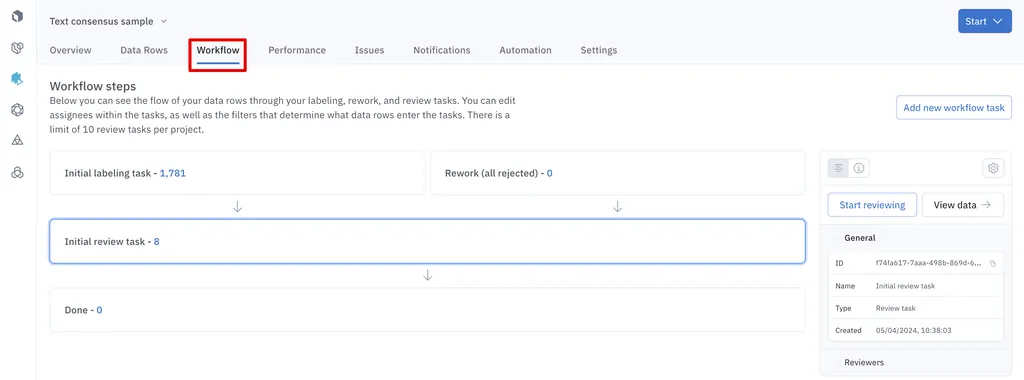
Labelbox's dashboard is user-friendly and well-organised, giving users a clear overview of the projects at a glance. It’s effortless to navigate, allowing users to quickly access different sections like tasks, labels, and quality checks. The dashboard provides a clear view of what tasks are in the queue, how many have been labelled, what has been reviewed, and any tasks that need to be redone or have issues. This intuitive design makes it easy for both new and experienced users to manage their work efficiently.
Setting up and Managing an audio project in Labelbox is straightforward. The platform guides through each step, from uploading audio files to setting up labelling tasks. Assigning tasks to a team is also simple and not complicated, making it convenient to manage who works on what. Additionally, users can clone or duplicate ontologies and labelling instructions, which is especially useful if handling multiple projects with similar requirements. This feature saves time and ensures consistency across projects without needing to re-enter all the details.
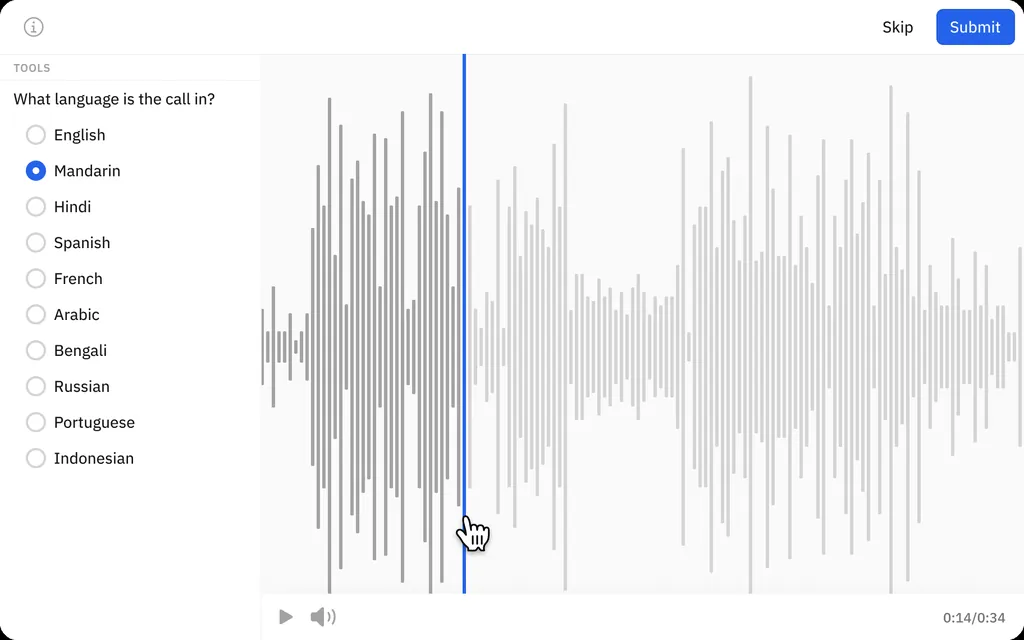
Annotation tools in Labelbox are designed to boost efficiency and accuracy. The platform features responsive playback controls, allowing users to easily navigate through audio files and adjust the playback speed to the desired pace, ensuring they catch every detail. A built-in timer tracks the time spent on each task, helping manage workflow effectively. The interface is equipped with built-in shortcuts for commonly used labels, which further speeds up the annotation process. Users can listen to the audio while labelling in real-time, ensuring that all annotations are accurate and contextually relevant.
Tool capabilities and quality
The heart of any audio labelling tool is its ability to produce accurate and reliable labels. Labelbox stands out in this area with its wide range of annotation features that address the needs of audio data labelling.
Tool capabilities
1. The transcription tool helps users turn spoken words into text with great precision. This feature comes in handy for projects that deal with voice recognition, speech analytics, or any task that needs to get text from audio. The platform works with many languages, and it can handle different accents and ways of speaking. This makes it a good fit for all kinds of audio datasets.
2. The audio classification tool allows users to classify audio clips into different groups. Pinpointing various sound events or group audio by content type; the sorting tools are strong and adaptable. This feature plays a key role in training AI models that need to spot different sounds or voice types. Being able to sort audio on the spot while adding notes boosts productivity and makes sure the data is set for model training without extra work.
3. Labelbox helps users tag and label specific sound events, like alarms, footsteps, or noises from the environment. This feature is key to developing applications for sound event detection and classification, which need to tell different types of sounds apart. The platform lets users mark and group these events in the audio, giving detailed and organised data to train AI models for various tasks in audio recognition.
Quality of Annotations
a. Labelbox’s audio labelling tool is built for precision, ensuring high-quality results. It has a review feature that lets reviewers double-check the work. They can fix any mistakes, approve correct labels, or send the tasks back for corrections if needed.
b. After labelling and review, files can be grouped into specific folders based on similar sounds. These folders can then be exported in JSON format, maintaining consistency and making it easier to manage large datasets where even small differences can impact the model’s performance.
Workflow Management
Team Management: Labelbox has strong team management tools, which make it easy to coordinate work among team members. Users can give out roles and permissions to make sure everyone can access what they need. This feature helps bigger teams where different people handle different parts of the project. By controlling who can do what, Labelbox helps stop changes that shouldn't happen and keeps the project moving forward as planned.
Tasks Assignment: Users can distribute labelling tasks among team members, set deadlines, and prioritise tasks. This organised approach is key for managing large projects and meeting deadlines.
Integrations: Labelbox supports integrations with cloud services like Google Cloud, AWS, and Azure. This feature enables secure data import and export, keeping data private and accessible while maintaining high security standards.
Quality Control: Users can set up several review steps where people look over the annotations to make sure they're accurate and complete before giving the final okay. This organised way of checking quality plays a key role in making sure the end product (the labelled data) is top-notch. The platform also lets reviewers give feedback or ask for changes, which helps to boost the accuracy and make sure all the annotations match up.
Project Tracking: The platform gives detailed reports and analytics on how projects are going, which helps users keep an eye on performance and spot areas to improve. These insights come in handy to manage big projects and make workflows better. For instance, project managers can use these analytics to find bottlenecks or things that slow down the labelling process and make changes as needed. This kind of oversight helps keep projects on time and within budget.
Labelbox’s support system is exceptional. Always available to address any issues encountered and are quick to offer assistance. Their prompt and helpful support ensures a smooth experience and effective problem resolution.
Audio Annotation for All Needs